
Most problems in school operations don’t come from big failures. They come from small, repeated frictions, accounts that don’t behave the way people actually work, reports that take too long to understand, and simple actions that require unnecessary steps.
This January, our updates focus on removing those friction points.
Every improvement you’ll see below was built from real usage across schools, real complaints from administrators, and real patterns we’ve observed over time. The goal is simple: make Shelf21 feel lighter, clearer, and more natural to use in day-to-day school management.
1. Multi-Account Management (One Person, Multiple Roles, Finally Done Right)
Schools don’t exist in isolation and neither do the people who run them.
With this update, one user can now manage multiple roles across different schools using the same account.
For example:
You can be a guardian in your child’s school and a teacher or staff member in another school without logging out, creating duplicate accounts, or getting confused access
Why this matters to you:
- No more creating multiple emails for the same person
- No more “I can’t access my other school” complaints
- Cleaner identity management across schools
- Less admin stress, fewer support tickets
This is especially useful for:
- Teachers who work in more than one school
- Parents who have children in different schools
Shelf21 now reflects how education actually works in real life.
2. A Restructured Report Management System (Cleaner. Faster. Easier.)
Reports are meant to give clarity not headaches.
We’ve restructured the entire report management system with a new interface and a simpler layout, making it easier to:
- Find reports quickly
- Understand what you’re looking at
- Generate and review reports without feeling overwhelmed
What changed:
- A cleaner interface
- A simpler design focused on usability
- Better flow when navigating reports
What this means for your school:
- Admins spend less time “figuring things out”
- Teachers can focus on results, not buttons
- School owners get information faster, without confusion
This update is about confidence, when you open your reports, you should immediately know what’s going on.
3. Password Regeneration Bugs Fixed (Credential Management Made Easier)
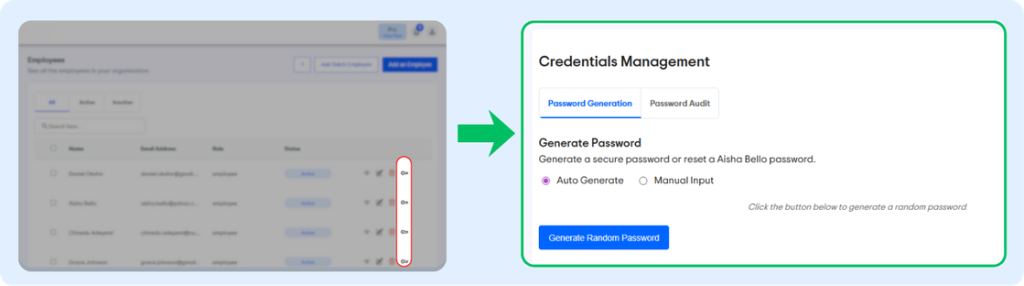
This one solves a quiet but frustrating problem many schools face.
Previously, regenerating passwords manually for employees and guardians under credential management was difficult.
That has now been fixed.
What’s improved:
- Password generation now works properly
- Fewer login issues for staff and parents
Why this matters:
- New staff get access without delays
- Parents don’t get locked out unnecessarily
- Admins stop wasting time on repeated password complaints
It’s a small fix but it removes a lot of daily friction.
4. Profile Deletion Is Now in Your Control
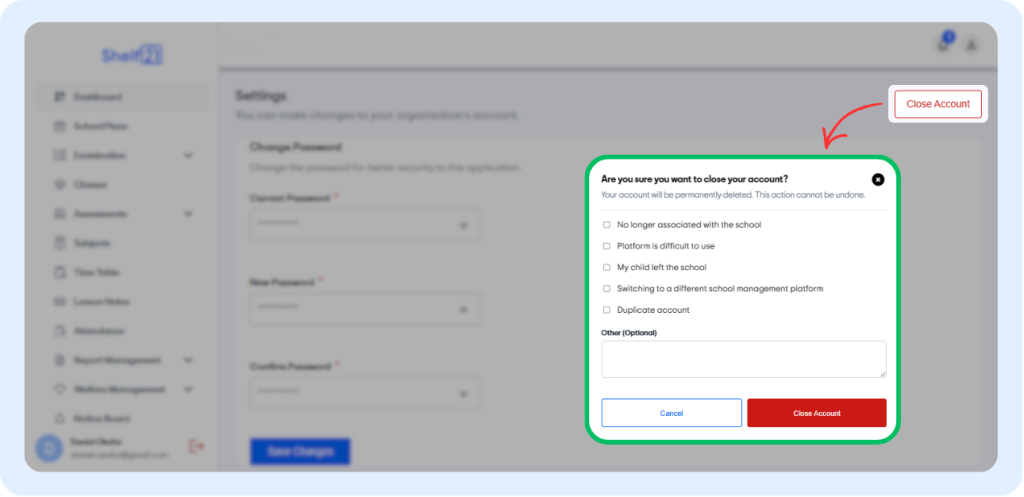
Before now:
Guardians and employees could not delete their own profiles even when they were no longer associated with a school
Now:
You can delete your own profile as a guardian or employee when needed
Why this matters:
- Better control over personal data
- Cleaner records for schools
- No more “inactive but stuck” accounts
This update respects user autonomy while helping schools keep their systems tidy and accurate.
Why These Updates Matter
None of these changes were made for show.
They were built because:
- Schools asked for
- Admins needed simplicity
- Users wanted control
- And daily operations needed to feel lighter, not heavier
That’s how Shelf21 evolves quietly, intentionally, and in service of how schools actually run.
More improvements are coming.
And as always, if you’re already using Shelf21, log in and explore these updates.
If you’re new, this is exactly the kind of system you want running your school behind the scenes.
Leave a Reply